For clinics
The patient app for clinics that prescribe.
Patients follow your prescription exactly; you get one weekly report instead of a stream of messages.
The problem
Where it goes wrong between visits.
mg vs. units
The plan is written in mg. The pharmacy label says units. Patients who do the math themselves can underdose for months without noticing. If the label says 50 units, it's 50 units. No math.
Message overload
Dose, timing and side-effect questions arrive one message at a time, from every patient, every week.
Missed doses
A missed dose often goes unmentioned until the next visit.
What your patient sees
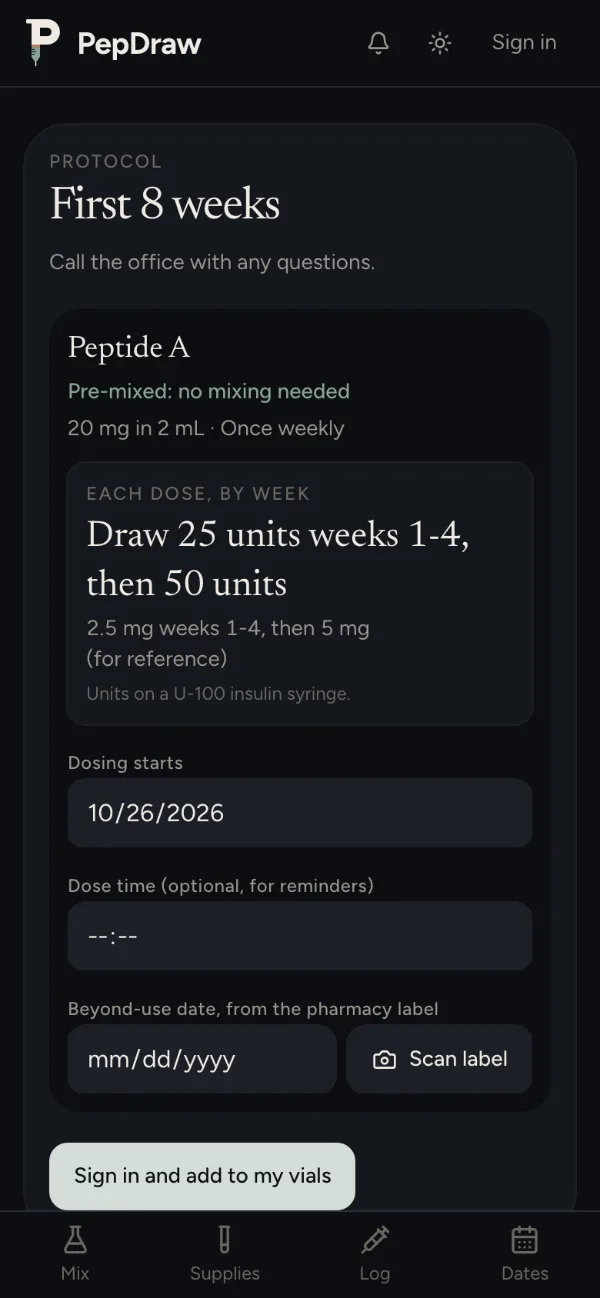
Each dose as the label gives it, in units on a U-100 syringe.
Draw 50 units (0.50 mL)
50.0 units on a U-1000–50 unitsDraw 25 units (0.25 mL)
25.0 units on a U-1000–50 units
How it works
You set it. Patients follow it. You see the week.
01
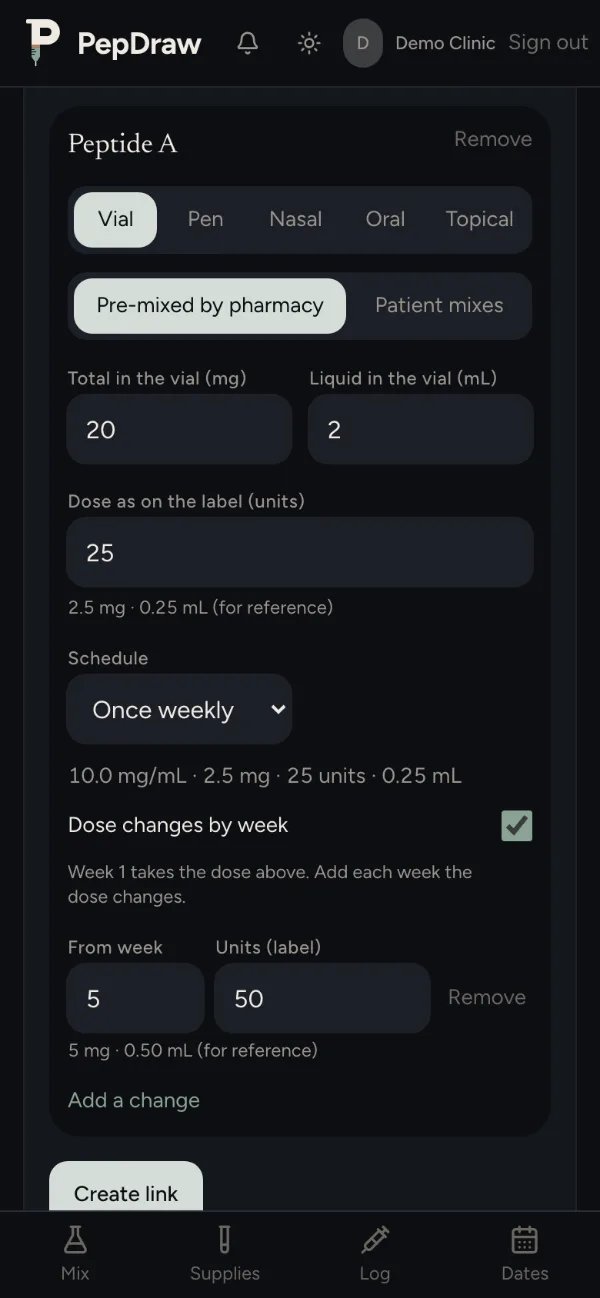
You set the protocol
In Build a protocol, enter each medication as prescribed: the dosage form, the dose as the pharmacy label gives it, any titration steps and the schedule. Then send your patient the link.
02
Patients get exact instructions and reminders
The link sets up their plan with your prescription and nothing else, with no dose suggestions. Each dose reads like the label, for example “Draw 50 units”, with a reminder before it once they turn on notifications.
03
You get the weekly report
Once a week your patient sends you one page with their doses, check-ins and weight, as a PDF or a private link.
A protocol link carries no patient's name. Each patient picks their own start date when they save it, and their records stay in their own account. Creating a link needs a PepDraw account.
Available now
What patients use today.
Prescription-based instructions and titration
Each dose reads the way the label does, for example “Draw 50 units”, with mg shown for reference. Titration steps change the dose by week.
Dosage forms
Pre-mixed vials, vials the patient mixes, pre-filled pens (clicks), nasal sprays, capsules, tablets and troches, and topical pumps or clicks. Each counts its own supply.
Reminders
A notification before each scheduled dose. It says “time for your scheduled dose” and never names the medication.
Check-ins on dose days
On dose days, patients note energy, sleep, appetite, side effects and how long they lasted, injection-site reactions, weight and a note. You see the week gathered in one report.
Weekly report
One page per week: doses taken, missed and late, adherence, titration step, check-in answers, flagged side effects and weight trend. Patients send it as a PDF or a private link that expires and can be turned off.
Guides and FAQ
Step-by-step guides for mixing and drawing a dose, and answers to common questions.
What's next
Coming with our founding clinics.
Upcoming, not available yet
Clinic dashboard
Every patient's weekly report in one place, with their permission.
Upcoming, not available yet
Text reminders
A text before each dose on your patient's schedule, for example Sunday and Wednesday. Texts never name the medication.
Upcoming, not available yet
Your clinic's FAQ
Answer a question once. Patients find the answer in the app instead of sending a message.
Upcoming, not available yet
Clinic branding
Your clinic's name and logo on the protocol page and in the app your patients use.
Upcoming, not available yet
Refill requests
Patients ask for a refill from the app when their supply runs low, and the request comes to your clinic.
Upcoming, not available yet
EHR integration (CharmHealth first)
Start a protocol from the prescription already in your EHR, and check it before your patient sees it.
None of this is available yet. Today your patient sends you their weekly report as a PDF or a private link.
PepDraw follows your prescription. It never recommends medications or doses.
Founding clinics
Become a founding clinic.
Tell us about your clinic. We reply by email.
FAQ
Questions.
Do patients need to download an app?
No. PepDraw works in the browser. On iPhone they can open it in Safari, tap Share, then Add to Home Screen, and use it from that icon. Reminders on iPhone only arrive through the Home Screen app.
Does PepDraw recommend medications or doses?
No. PepDraw follows your prescription. It never recommends medications or doses.
How do we see how a patient is doing?
Your patient sends you their weekly report as a PDF or a private link. Clinic accounts are not available yet.